Managing API tokens in Striim Cloud
Striim Cloud provides programmatic access through an API that allows scripts, tools, and services to invoke Striim Cloud functionality without requiring an interactive user login. Striim Cloud secures API access with token-based authentication over TLS and enforces operational controls including mandatory expirations, token rotation and revocation, audit logging, and an account-level disable switch.
This topic describes how to manage the two token types supported by Striim Cloud: personal access tokens (PATs) and service account tokens.
Token types
Striim Cloud supports two kinds of API tokens, each intended for a different use case.
Personal access tokens (PATs): A PAT inherits the exact privileges of the user who created it and is intended for personal scripts, tools, and developer tasks. Each user may have only one active PAT. Users must select an expiry when creating a PAT. The Custom option lets you specify the duration in hours or days (maximum: 90 days).
Service account tokens: Admin-level credentials intended for shared automation such as CI/CD pipelines or scheduled jobs. Only account administrators may create, rotate, or revoke service account tokens. An account may have up to three active service account tokens. The Custom option lets you specify the duration in hours or days, up to a maximum of 12 months.
Key concepts and rules
The following principles govern how API tokens are used and managed.
One PAT per user: Each user may have one active PAT. Attempts to create a second active PAT for the same user will fail with a conflict. Use the rotate operation to replace an existing PAT.
PAT privileges: A PAT has exactly the same privileges as the user who created it. Use PATs only where personal-level access is appropriate.
PAT expiry is required: When creating a PAT, users must specify an expiry date. The Custom option lets you specify the duration in hours or days, up to a maximum of 90 days.
Service account limits: Administrators may create up to three active service account tokens per account. The Custom option lets administrators specify the duration in hours or days, up to a maximum of 12 months.
Token visibility: The full token value is displayed only once when the token is created. Copy and store it immediately. If the value is lost, the token must be rotated or recreated.
User self-management: Users can create, rotate, and revoke their own PATs. They cannot manage tokens belonging to other users.
Administrator capabilities: Administrators can create, rotate, and revoke service account tokens. They can revoke PATs on behalf of any user in the account.
Global PAT toggle: Administrators can disable personal access tokens across the entire organization. When disabled, all existing PATs become invalid immediately and new PATs cannot be created until re-enabled.
Roles and permissions
Roles determine what actions a user can perform on API tokens.
Action | Regular user | Administrator |
|---|---|---|
Create own PAT | Yes | Yes |
Rotate own PAT | Yes | Yes |
Revoke own PAT | Yes | Yes |
Revoke another user's PAT | No | Yes |
Create service account token | No | Yes |
Rotate service account token | No | Yes |
Revoke service account token | No | Yes |
Enable or disable global PAT toggle | No | Yes |
Token management UI
Token Management is the central location in the Striim Cloud console where you manage API tokens. It offers separate views for service accounts, personal tokens, and governance controls.
Managing personal access tokens
Personal access tokens are tied to individual users and provide access with the same privileges as the user. They are intended for personal scripts and developer tasks. Do not embed PATs in shared automation or CI/CD pipelines. Use service account tokens instead.
When to use a PAT
Use a PAT for personal API tasks such as testing, local scripts, and developer utilities. Each PAT is bound to a single user and should not be shared with other users or embedded in shared code.
Creating a PAT
To create a new PAT:
Open the API Token Management page and select the Personal Token tab.
Click Create Token.
Select the token expiry period from the available predefined options, or choose Custom to specify a custom duration in hours or days. The maximum allowed expiry period is 90 days.
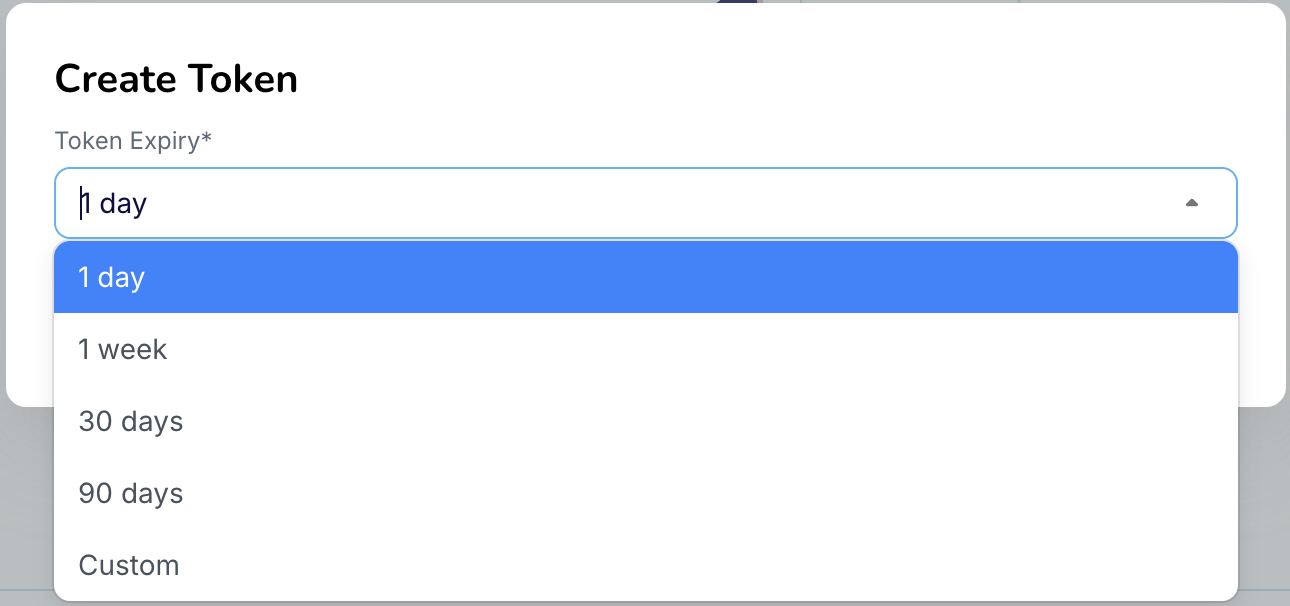
Click Create Token. The token value is displayed once.
Copy the token value and store it securely in a secrets manager before clicking Done.
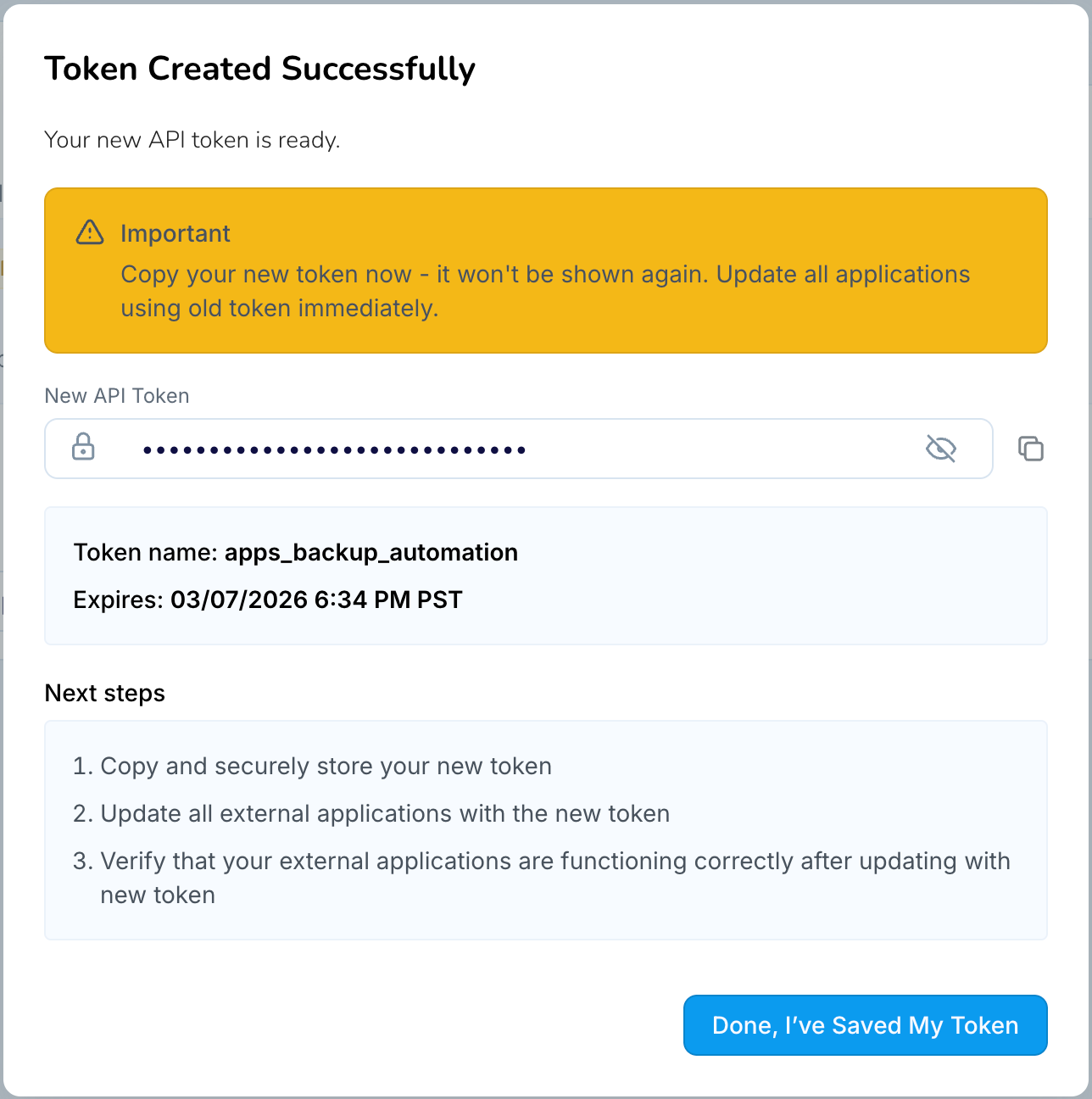
Important
The full token value is displayed only once. If the value is lost, you must rotate or recreate the token.
Note
Short-lived tokens with an expiry of less than one day can be created through either the Striim Cloud console (using the Custom option to specify hours) or the API. This section describes how to set a custom expires-at value when creating tokens programmatically.
Rotating a PAT
To replace an existing PAT, rotate (also referred to as regenerate) the token. Rotating a PAT immediately invalidates the current token and generates a new one. Only one active PAT is allowed per user.
To rotate a PAT:
Open Token Management in the Striim Cloud console.
Select the Personal Token tab.
Locate your PAT and click Regenerate.
If required, update the expiry date for the new token.
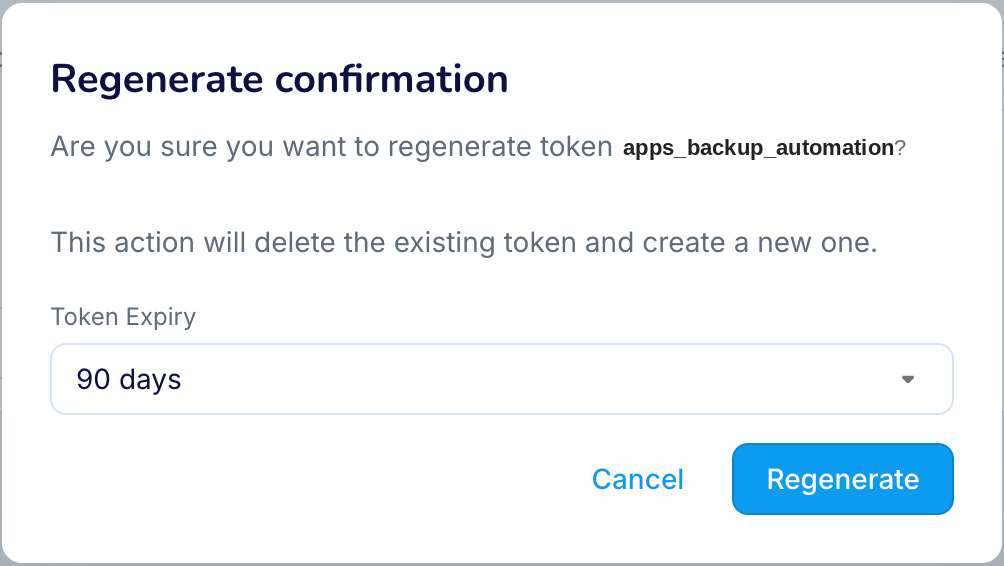
Copy the newly generated token value and update any scripts or tools that use the previous token.
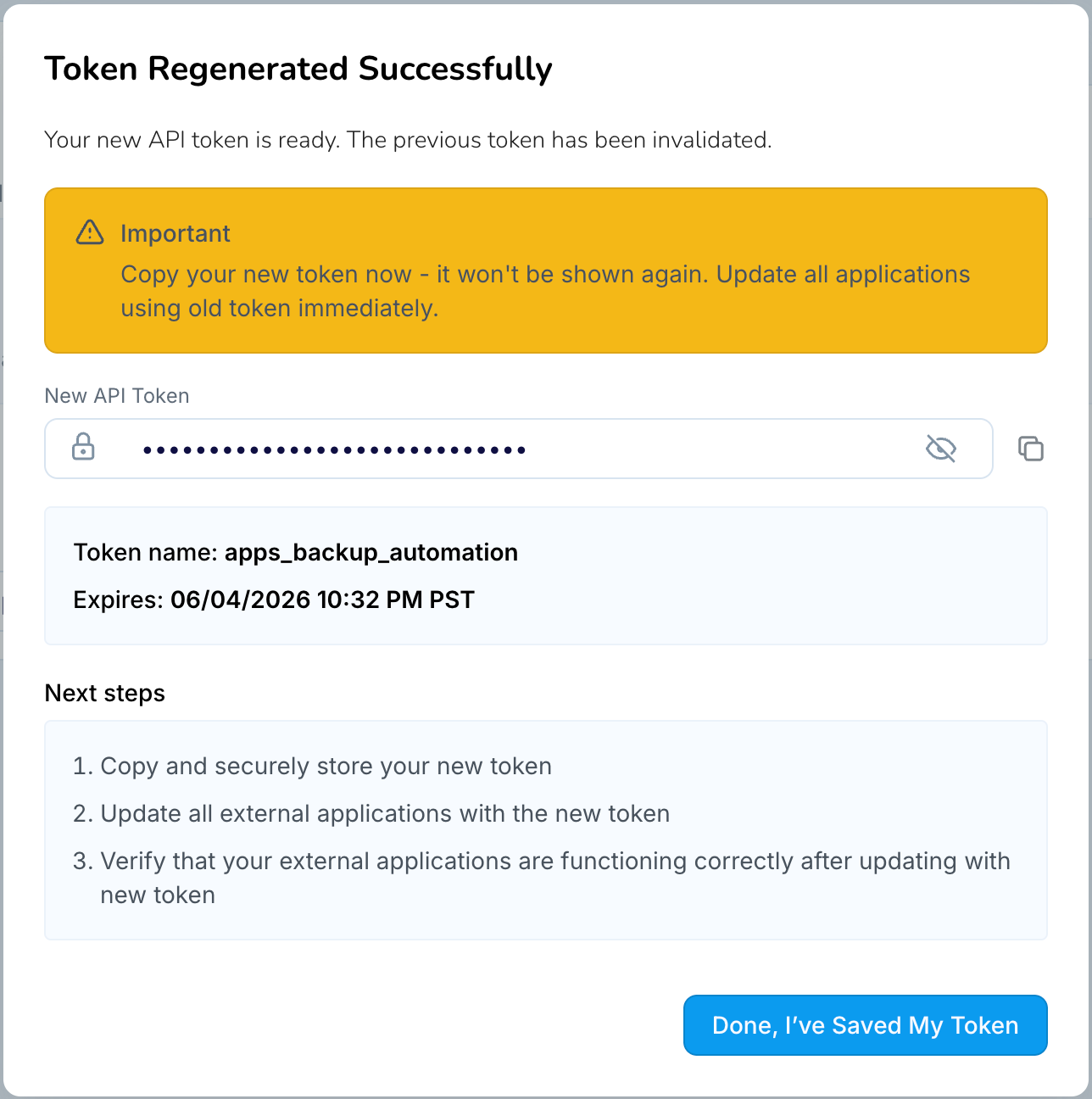
Important
The new token value is displayed only once. Copy and store it securely before leaving the page.
Revoking a PAT
If a PAT is no longer required or you suspect it has been exposed, revoke it. Revoking a PAT immediately invalidates the token and prevents any further API requests using that token.
To revoke a PAT:
Open Token Management in the Striim Cloud console.
Select the Personal Token tab.
Locate the token you want to revoke and click Revoke.
Confirm the action when prompted.
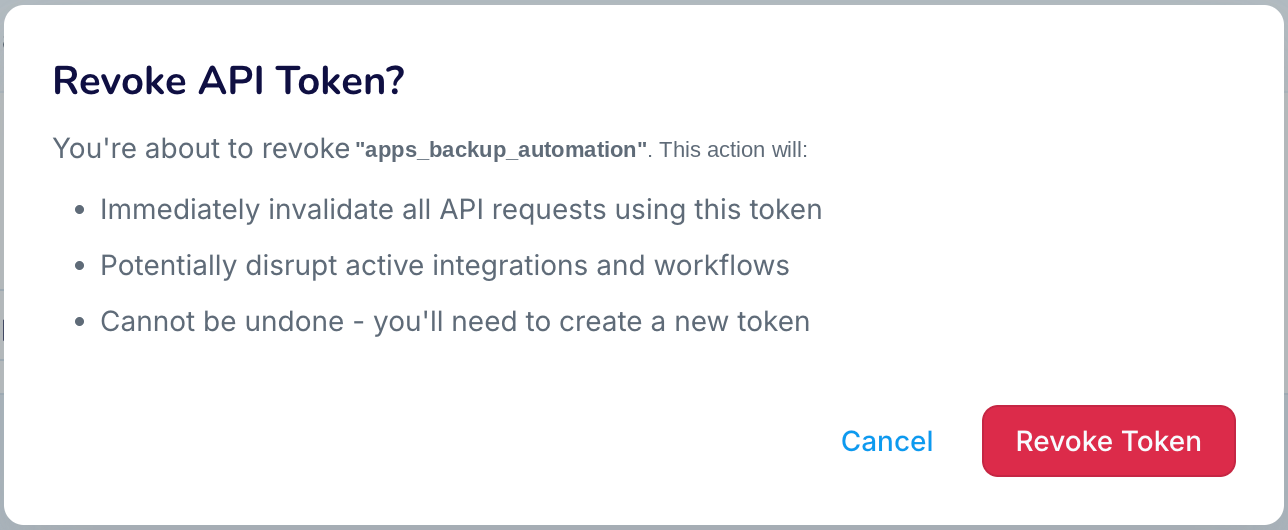
Update any scripts or tools that were using the revoked token to ensure they no longer reference it.
Important
Once revoked, the token cannot be restored. If you need continued access, create or rotate a new token.
Managing service account tokens
Service account tokens provide admin-level access and are intended for shared automation such as CI/CD pipelines, scheduled integrations, and system-level scripts. Because they carry elevated privileges, treat them as highly sensitive secrets and store them in a secure vault.
Creating a service account token
To create a service account token:
Open Token Management in the Striim Cloud console.
Select the Service Accounts tab.
Click Create Token.
Enter a name (3 to 30 characters) and optionally provide a description.
Select an expiry period from the predefined options, or choose Custom to specify a duration in hours or days. The maximum allowed expiry is 12 months.
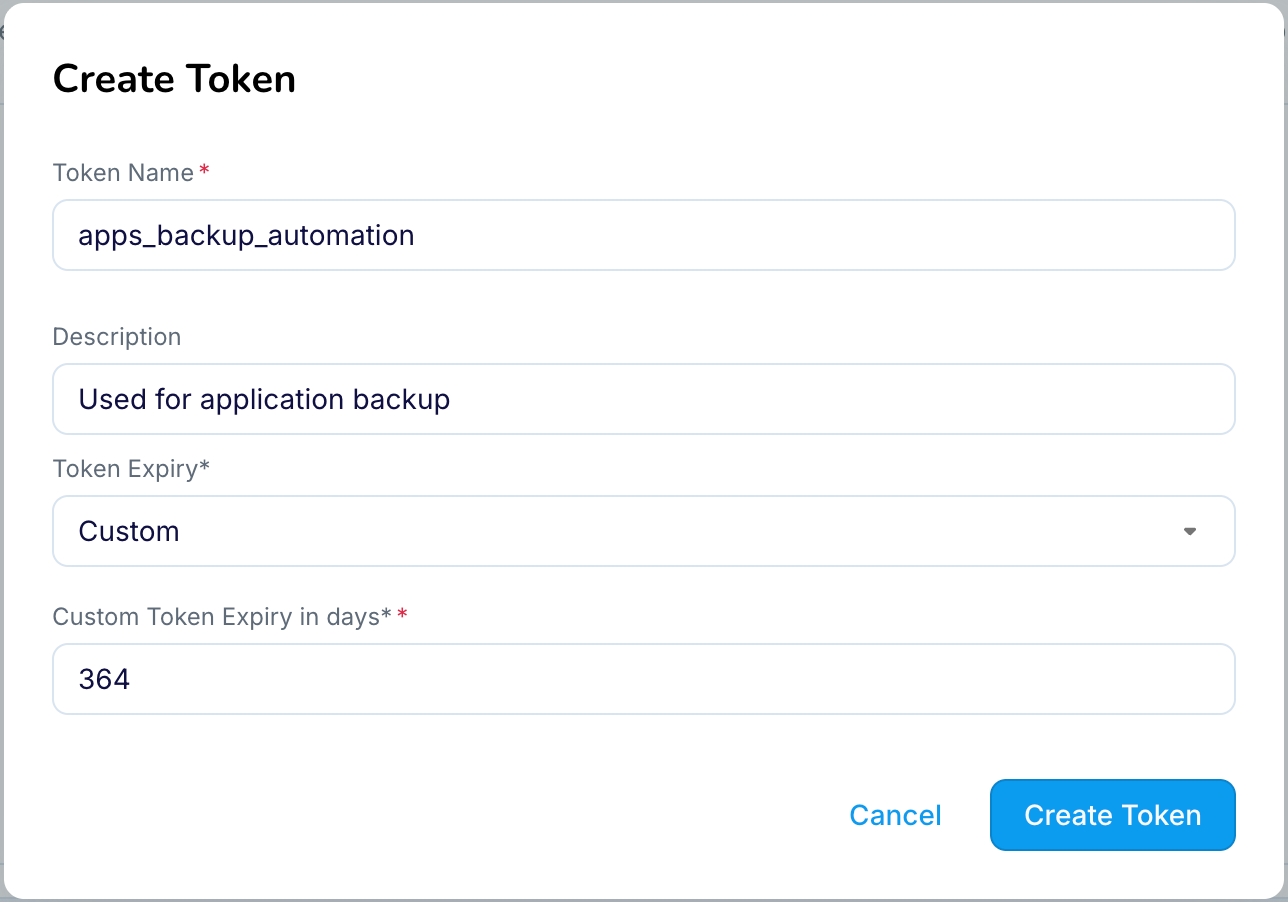
Click Create.
Copy the generated token value and store it securely in a secrets manager or vault.
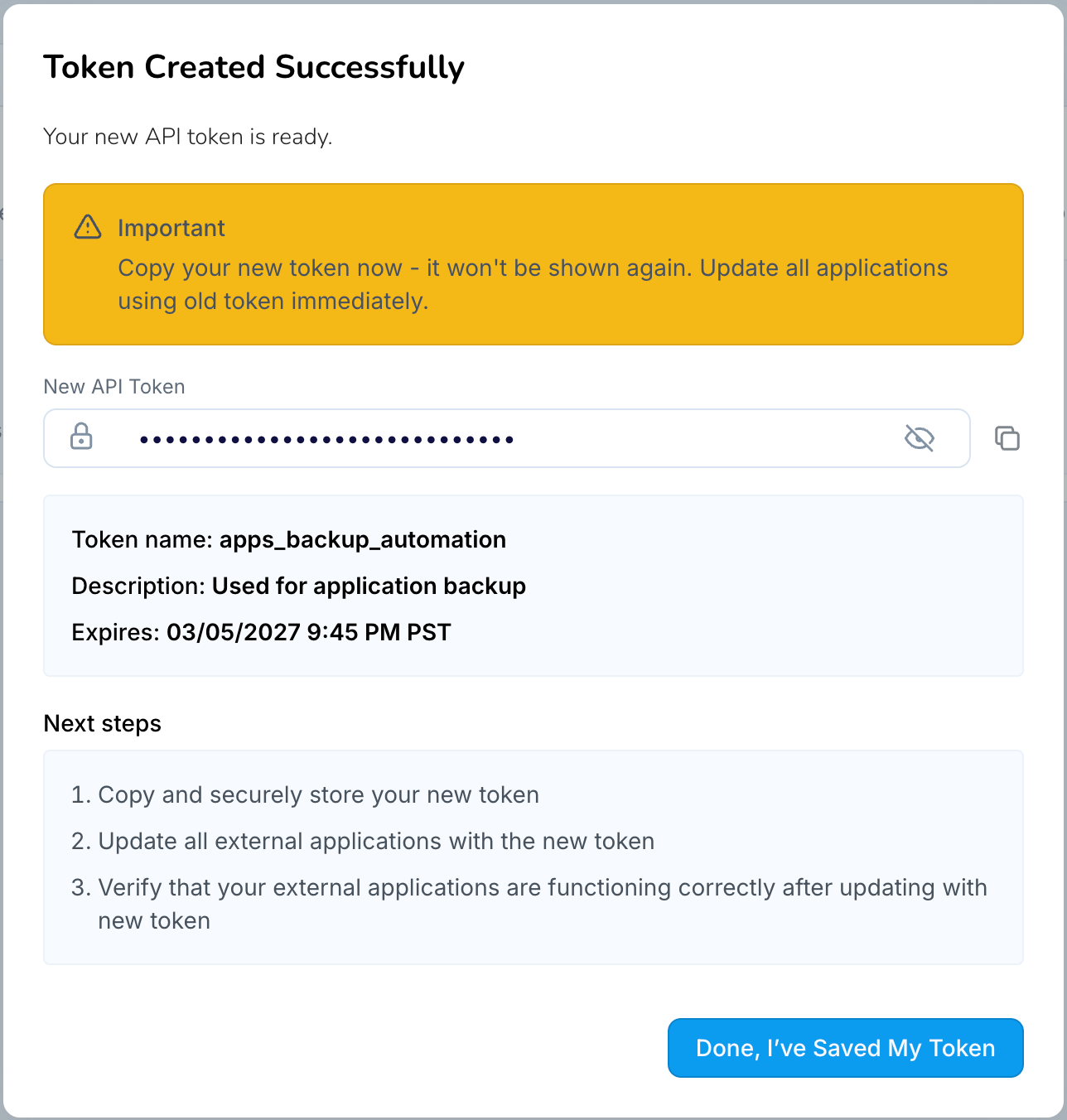
Important
The full token value is displayed only once. If the token value is lost, the token must be rotated or recreated.
Note
Service account tokens are treated as a service-level principal within Striim Cloud. Upon creation, a service token is automatically federated across all running services within the account, enabling consistent authentication and authorization behavior.Administrators can manage the association of a service token with individual services at any time. A service token can be federated to or removed from specific services through the User Management page within each service.
Rotating a service account token
Administrators can rotate a service account token to generate a new token value and reset its expiry period. Rotating a token immediately invalidates the existing token.
To rotate a service account token:
Open Token Management in the Striim Cloud console.
Select the Service Accounts tab.
Locate the service account token you want to rotate.
Click Rotate (or Regenerate) for the token.
If required, update the expiry period for the new token.
Copy the newly generated token value and update any automation, scripts, or integrations that use the previous token.
Important
The new token value is displayed only once. Copy and store it securely before leaving the page.
Revoking a service account token
If a service account token is no longer required or has been compromised, revoke it. Revoking a token permanently deletes it and immediately prevents any further API requests using that token.
To revoke a service account token:
Open Token Management in the Striim Cloud console.
Select the Service Accounts tab.
Locate the token you want to revoke.
Click Revoke for the token.
Confirm the action when prompted.
Important
After revocation, any automation, scripts, or integrations using this token must be updated to use a different valid token.
Token governance and notifications
Striim Cloud includes governance features that help administrators control how tokens are used and monitor activity across the organization.
Global PAT disable
Administrators can disable personal access tokens across the entire organization. When disabled, all existing PATs become invalid immediately and users cannot create new PATs. Use this control for rapid security lockdowns. Re-enabling PATs does not restore previously disabled tokens; users must create new PATs.
Audit logging and metrics
All token operations (creation, rotation, and revocation) are recorded in account-level audit logs. Audit entries include the actor, action, target token, and timestamp, allowing administrators to trace usage and enforce compliance. Metrics such as the number of service accounts and PATs created, rotated, or revoked, as well as API usage by token type, provide visibility into adoption and help inform security policies.
Expiry notifications
Striim Cloud automatically sends email notifications before tokens expire. Owners of PATs receive notifications seven and three days prior to expiry. Administrators are notified about service account tokens that are about to expire.
Programmatic token management
You can manage API tokens programmatically using the Striim Cloud REST API. These APIs allow administrators and users to create, inspect, rotate, and revoke tokens for both service accounts and personal access tokens.
Endpoints that operate on service account tokens or other users' tokens require administrator-level authentication.
Base URL
API requests must be sent to your account-specific subdomain. Replace {your-account} with your Striim Cloud account short name.
Cloud provider | Base URL |
|---|---|
Google Cloud |
|
Microsoft Azure |
|
AWS |
|
The base URL for your account is also displayed on the Personal Token tab of the Token Management page in the Striim Cloud portal.
Service account API reference
The following endpoints manage service account tokens. All service account endpoints require administrator-level authentication (a bearer token of an account admin or another service account token).
List service accounts
Returns all service account tokens for the account.
curl -X GET "https://{your-account}.striim.cloud/api/v1/service-accounts" \
  -H "Authorization: Bearer <your-token>"
Create a service account
Creates a new service account token.
curl -X POST "https://{your-account}.striim.cloud/api/v1/service-account" \
  -H "Authorization: Bearer <your-token>" \
  -H "Content-Type: application/json" \
  -d '{
    "name": "app_automation",
    "description": "Token for automation",
    "expires-at": "2027-02-09T00:00:00Z"
  }'
Request body fields:
Field | Required | Description |
|---|---|---|
| Yes | A unique name for the service account (3 to 30 characters). |
| No | A description of the token's purpose (maximum 255 characters). |
| No | Expiration date in ISO 8601 format. Defaults to the account-level expiration setting. |
Sample response:
{
  "token-id": 12345,
  "name": "app_automation",
  "token": "9AbCdEfG3h4I-jKlMn-OpQrStUvWx",
  "expires-at": "2027-02-09T00:00:00Z"
}
Note
The full token value is displayed only once in the response. Copy and store it securely before proceeding.
Rotate a service account token
Generates a new token value for an existing service account and invalidates the previous token.
curl -X POST "https://{your-account}.striim.cloud/api/v1/service-account/rotate" \
  -H "Authorization: Bearer <your-token>" \
  -H "Content-Type: application/json" \
  -d '{
    "name": "app_automation",
    "expires-at": "2028-02-09T00:00:00Z"
  }'
Sample response:
{
  "name": "app_automation",
  "token-id": 9121,
  "token": "3XnFhHLnzuMH.5eN78ZMlKaVUjibC",
  "updated-at": "2026-03-11T06:19:25.758175685Z",
  "updated-by": 8509,
  "expires-at": "2028-02-09T00:00:00Z"
}
Note
The full token value is displayed only once in the response. Copy and store it securely before proceeding.
Delete a service account
Deletes a service account and invalidates its token.
curl -X DELETE \
  "https://{your-account}.striim.cloud/api/v1/service-account?name=ci-pipeline" \
  -H "Authorization: Bearer <your-token>"
Personal access token (PAT) API reference
The following endpoints manage personal access tokens. Users can manage their own tokens, while administrators can also manage tokens for other users.
Get token information
Returns token information for the authenticated user.
curl -X GET "https://{your-account}.striim.cloud/api/v1/user-token" \
  -H "Authorization: Bearer <your-token>"
Administrators can retrieve another user's token information by specifying the user's email address.
curl -X GET \
  "https://{your-account}.striim.cloud/api/v1/user-token?email=user@example.com" \
  -H "Authorization: Bearer <your-token>"
Rotate a personal access token
Creates a new PAT and invalidates the current one.
curl -X POST \
  "https://{your-account}.striim.cloud/api/v1/user-token/rotate" \
  -H "Authorization: Bearer <your-token>" \
  -H "Content-Type: application/json" \
  -d '{
    "email": "user@example.com",
    "expires-at": "2027-02-09T00:00:00Z"
  }'
Revoke a personal access token
Revokes a personal access token. To revoke your own token:
curl -X DELETE \
  "https://{your-account}.striim.cloud/api/v1/user-token?email=user@example.com" \
  -H "Authorization: Bearer <your-token>"
Administrators can revoke another user's token by specifying the user ID.
curl -X DELETE \
  "https://{your-account}.striim.cloud/api/v1/user-token?user-id=1234" \
  -H "Authorization: Bearer <your-token>"
Token governance API reference
The following endpoints manage account-level token governance settings. These endpoints require administrator-level authentication.
Check PAT status
Returns the current global personal access token enable/disable status for the account.
curl -X GET "https://{your-account}.striim.cloud/api/v1/user-token/status" \
  -H "Authorization: Bearer <your-token>"
Toggle PAT status
Enables or disables PAT usage across the entire account. When PATs are disabled, all existing PATs become invalid immediately.
curl -X PATCH "https://{your-account}.striim.cloud/api/v1/user-token/status" \
  -H "Authorization: Bearer <your-token>"
Legacy tokens and migration
Legacy tokens were issued before Striim introduced mandatory expiry dates. These tokens have no expiry and remain valid until revoked or rotated. While existing legacy tokens continue to work, all new tokens require a mandatory expiry date. Striim recommends migrating legacy tokens to time-bounded tokens to improve security.
Identification: In the UI, legacy tokens are labelled "Legacy Token" with no expiry date.
Recommended remediation: Rotate personal legacy tokens into personal tokens with an expiry, or replace automation tokens with service account tokens stored in a secrets manager.
Planned retirement: Striim may retire support for legacy tokens after a remediation window. Administrators will receive notifications in advance of any retirement date.
Errors, limits, and troubleshooting
The API returns standard HTTP responses. Understanding these responses and the system's rate limits helps you diagnose and correct issues.
API error responses
The following table lists the common HTTP status codes returned by the API.
Status code | Description |
|---|---|
400 | Invalid request parameters. |
401 | Missing or invalid token. Verify that the Authorization header uses the format |
403 | Insufficient permissions. The token may not belong to the account specified in the URL subdomain, or the operation requires administrator privileges. |
404 | Resource not found. Verify the service account name (case-sensitive) or user identifier. |
409 | Conflict. The maximum number of service accounts has been reached, or the user already has an active PAT. To replace an existing PAT, use the rotate endpoint instead. |
429 | Rate limit exceeded. Wait before retrying and implement exponential backoff in automated workflows. |
Rate limits
Striim Cloud enforces the following rate limits per token management operation.
Operation | Limit |
|---|---|
Creation and rotation of PATs and service account tokens | 10 requests per minute |
Revocation of PATs and service account tokens | 30 requests per minute |
Toggling PAT usage on or off | 5 requests per minute |
Implement exponential backoff in automated workflows to avoid hitting rate limits.
Recommended best practices
Follow these practices to protect your API tokens and maintain a secure environment.
Use service account tokens for CI/CD and shared automation. Do not embed PATs in production pipelines.
Store tokens in a secure secrets manager (for example, HashiCorp Vault, AWS Secrets Manager, or Azure Key Vault).
Set the shortest practical expiry for automation tokens. Use the Custom option to specify short durations in hours when appropriate for your use case.
Rotate tokens regularly, and automate rotation where possible.
Limit service account usage to the automation that requires admin privileges. Monitor and audit their activity.
Use the global PAT disable control to quickly lock down personal access if you suspect misuse.